The purpose of this article is to provide a framework for understanding Batch Process Rules configuration, define the various conditions available and give ideas of when to use them.
When a user configures multiple rules for an inquiry type, TrueACH interprets this as “OR”. On the other hand, if the user configures multiple conditions within the same rule TrueACH interprets this as “AND”.
For example, I create a rule for SEC Code = WEB and a second rule for Transaction Code = 27 (Debit Destined for a Checking Account). TrueACH will run an inquiry for a transaction if the SEC Code is WEB OR the Transaction Code is 27. However, if I created one rule with both conditions TrueACH will only run an inquiry if the transaction has both an SEC Code of WEB AND a Transaction Code of 27.
Inquiry Type and Prior Validations
There are a series of conditions that start with “Prior Validation – …“. Their purpose is to allow the FI to trigger an inquiry - or not - based on inquiries performed on past transactions.
When added to a rule there MUST be inquiries run on past transactions for the rule to be applied.
They are applied differently depending on whether the conditions are being set for Account Status Only inquiries vs. AOA Only or Account Status + AOA inquires.
If a Prior Validation type condition is set for an Account Status Only inquiry, TrueACH will consider the routing #, account number and client id (FI identification #) for past transactions.
If a Prior Validation type condition is set for an AOA Only or Account Status + AOA inquiry, TrueACH will consider the routing #, account number, business name OR first/last names and client id for past transactions.
Important Tip
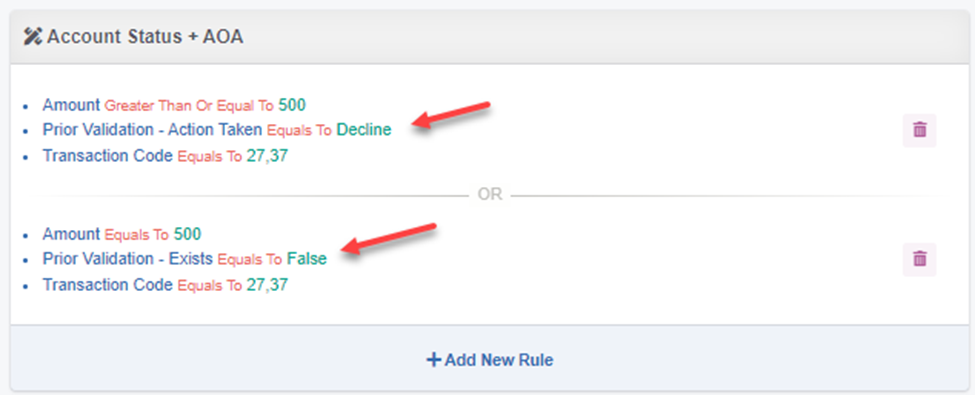
If a “positive” “Prior Validation” condition such as Prior Validation – Action Taken = Decline is part of a rule, it’s critical that they have a separate rule with the condition: Prior Validation Exists = False. Otherwise, TrueACH will never run an inquiry.
Condition Definitions
|
Condition |
Definition |
|
Amount |
Set condition based on transaction dollar amount. Over, under etc. |
|
“On Us” …. |
Allows an FI to prevent inquiries against transactions for their own institution. Administrators define “On Us” transactions in Settings -> Configuration by entering the FI’s routing number(s). |
|
Prior Validation – Action Taken |
If configured, TrueACH will only run an inquiry if: An inquiry has been run in the past and a Reviewer set the Action Taken. The Administration can set the condition to consider: Accepted, Declined or either. |
|
Prior Validation – AOA Match |
If configured, TrueACH will only run an inquiry if: an AOA inquiry was run against a prior transaction which returned either a True or False. Best use case is the FI does not want to run another AOA inquiry if they have run one in the past and the person/business was determined to be authorized for the account (i.e. True). |
|
Prior Validation – Exists |
If configured TrueACH will simply look to see if there has been an inquiry run in the past regardless of recommendation or action taken. If it is set for Account Status Only it will just look for past account status inquires. If it is for AOA Only or Account Status + AOA, then it will look for past AOA inquiries. If the Administrator sets this to equal False TrueACH will only run an inquiry if none have been run before. If set to equal True it will only run an inquiry if one has been run in the past. This is the most comprehensive “Prior Validation” condition to prevent running multiple inquiries that may not add value. |
|
Prior Validation – Recommended Action |
If configured, TrueACH will only run an inquiry if: An inquiry has been run in the past and the recommended action returned meets the condition set by the Administrator: Accept, Decline, Warning or No Information. Admin can set one or more recommendations. Example use case: I do not want to run an AOA inquiry if I’ve run one in the past and the recommendation was Accept or No Information. |
|
Prior Validation –Frequency (In Days) |
Allows the user to reset rules after a specific number of days has elapsed. The recommended use case is when they have set a “prior validation” condition to prevent subsequent inquiries. For example, they have set a condition to not run an AOA inquiry if one has been run for the person and account in the past. But every 6 months (180 days), they want to run it again. Another example may be, they don’t want to check account status more than one per day. Then they would set a condition: Prior Validation exists = False. And the condition: Prior Validation Frequency (in Days) = 1. |
|
Prior Validation – Routing Number |
If configured, TrueACH will only run an inquiry if: An inquiry has been run in the past and the transaction meets the criteria set for the routing number. Recommended use is if an FI wants to exclude routing numbers other than their own. Note they should use “On Us” rules to exclude their own routing numbers. |
|
SEC Code |
This condition will run inquires based on the transaction’s SEC Code. Users can select one or more codes. |
|
Transaction Code |
This condition will run inquires based on the transaction code. Users can select one or more codes. |
Comments
0 comments
Please sign in to leave a comment.